Opsflw Managed Elasticsearch Platform
Deploy and operate Elasticsearch and Kibana in your Azure subscription through an Azure Marketplace Managed Application. iVedha manages the supported platform lifecycle, with Opsflw providing deployment and operations automation.
The platform provides a managed foundation for search, observability, analytics, and eligible AI use cases without requiring the customer to build and operate the underlying Azure and Elastic platform alone.
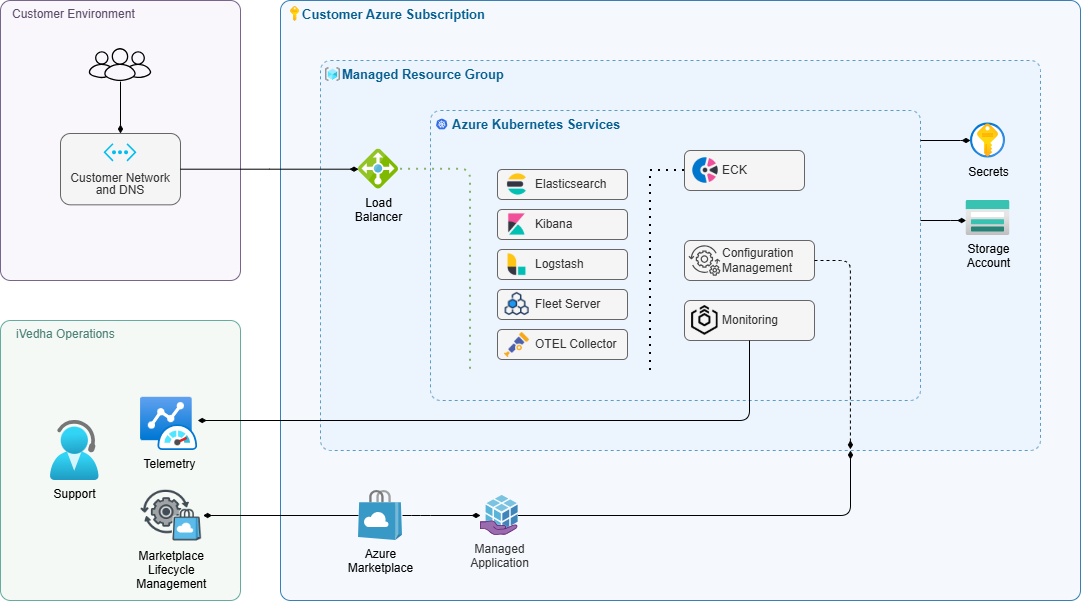
The platform runs in the customer's Azure subscription. The customer owns the subscription, connectivity, identity, DNS, and data onboarding. iVedha/Opsflw manages platform deployment and operations through supported managed application interfaces and automation.
What the platform provides
The Azure Managed Application creates a customer-visible application resource and a managed resource group containing the platform infrastructure. Elasticsearch and Kibana run on Azure Kubernetes Service (AKS), with supporting Azure services for networking, secrets and certificates, storage, monitoring, and lifecycle operations.
The exact resources, capacity, topology, endpoints, and licensed features depend on the selected Marketplace plan and deployed platform version.
| Capability | Typical use |
|---|---|
| Elasticsearch | Index, search, and analyze application, operational, business, or vector data |
| Kibana | Explore data, build dashboards, and perform supported administration |
| Managed Azure runtime | Run the platform on AKS in the customer's Azure subscription |
| Public or private access | Connect users and data sources using the approved network model |
| Managed lifecycle | Provision, reconcile, monitor, maintain, and upgrade the supported platform |
This is not Elastic Cloud hosted outside the customer environment, and it is not an unmanaged Kubernetes package. Customers use the managed application, Elasticsearch, Kibana, and documented customer actions rather than modifying managed infrastructure directly.
For the detailed component and Azure resource model, see architecture details and platform components.
Who manages what
| Customer | iVedha / Opsflw |
|---|---|
| Azure subscription, billing, policy, and quota | Managed application provisioning and reconciliation |
| Network routes, Private Endpoints, and DNS | Platform configuration and supported lifecycle actions |
| Microsoft Entra identity and customer access decisions | Platform health monitoring and managed operations |
| Data onboarding, data governance, and workload outcomes | Supported maintenance, upgrades, and troubleshooting |
| Elastic license and customer-managed integrations | Customer-facing deployment details and managed support workflows |
The managed application does not transfer ownership of the customer's Azure subscription, identities, network, DNS, or data to iVedha. Some managed-resource platform telemetry is sent to iVedha operations for platform health monitoring; customer Elasticsearch indices and application data remain customer-owned.
For detailed task-level ownership and safety boundaries, see shared responsibility.
Choose public or private connectivity
Choose the access model before deployment.
- Public connectivity uses internet-reachable service endpoints with TLS, authentication, and deployment-supported access restrictions.
- Private connectivity uses Azure Private Endpoint connectivity and requires customer-managed routing, private DNS, and certificate trust where applicable.
For the decision criteria and required ownership, see plan connectivity.
What AI-ready means
AI-ready means the platform can provide the Elasticsearch and Kibana foundation for eligible full-text search, vector search, inference, machine-learning, and AI-assisted use cases. It does not mean every AI feature or external model service is enabled by default.
Before using an AI capability, verify the deployed Elastic version and license, selected topology and capacity, required integrations and outbound connectivity, and your organization's security and data-governance requirements.
Follow the customer journey
- Plan — decide the Azure subscription, region, capacity, topology, connectivity, DNS, TLS approach, maintenance window, and owners.
- Deploy — create the managed application from the approved Azure Marketplace offer and monitor platform readiness.
- Next Steps — reset the administrator password, complete network, DNS, and TLS configuration, and verify Elasticsearch and Kibana access.
- Operate — configure access, onboard data, use the platform, monitor health and capacity, and perform supported lifecycle tasks.
- Get Help — identify the failing layer, collect safe evidence, and use the managed support path when needed.
- Reference — look up architecture, responsibilities, deployment fields, lifecycle states, permissions, capacity, compatibility, limits, and terms.
Before you deploy
Be ready to choose your Azure region, workload profile, capacity, topology, connectivity model, DNS ownership, certificate approach, maintenance window, and support contacts.
Start with the planning overview. For another iVedha application, return to the Opsflw documentation catalog.